CentOS 架设PPTP VPN服务教程
草稿: 本文因某种原因尚未公开。
专栏文章
在网上搜集了一些 vpn 安装部署的脚本,提交到xiexianbin/vpn,以防后忘。
准备
检测 PPP 是否开启
bash
[root@ip-172-31-17-56 ~]# cat /dev/ppp
cat: /dev/ppp: No such device or address- 开启成功的标志:
cat: /dev/ppp: No such device or address - 未安装/设备不存在标志:
cat: /dev/ppp: No such file or directory - 没有权限标志:
cat: /dev/ppp: Permission denied
检测 tun/tap 是否开启:
bash
[root@ip-172-31-17-56 ~]# cat /dev/net/tun
cat: /dev/net/tun: File descriptor in bad state
显示结果为上面面的文本,表明通过,可以继续安装。
检测是否 ppp:
bash
[root@ip-172-31-17-56 ~]# modprobe ppp-compress-18 && echo yes
yes
安装
bash
[root@ip-172-31-17-56 ~]# yum -y install ppp pptpd
Loaded plugins: amazon-id, rhui-lb, search-disabled-repos
bintray-tatsushid-h2o-rpm                                                                                                                                                                         | 1.3 kB  00:00:00
epel-rpm                                                                                                                                                                                          | 4.3 kB  00:00:00
rhui-REGION-client-config-server-7                                                                                                                                                                | 2.9 kB  00:00:00
rhui-REGION-rhel-server-releases                                                                                                                                                                  | 3.5 kB  00:00:00
rhui-REGION-rhel-server-rh-common                                                                                                                                                                 | 3.8 kB  00:00:00
(1/6): rhui-REGION-rhel-server-rh-common/7Server/x86_64/updateinfo                                                                                                                                |  31 kB  00:00:00
(2/6): rhui-REGION-rhel-server-releases/7Server/x86_64/updateinfo                                                                                                                                 | 1.8 MB  00:00:00
(3/6): rhui-REGION-rhel-server-rh-common/7Server/x86_64/primary_db                                                                                                                                | 116 kB  00:00:00
(4/6): rhui-REGION-rhel-server-releases/7Server/x86_64/primary_db                                                                                                                                 |  34 MB  00:00:01
(5/6): epel-rpm/updateinfo                                                                                                                                                                        | 760 kB  00:00:03
(6/6): epel-rpm/primary_db                                                                                                                                                                        | 4.6 MB  00:00:04
Package ppp-2.4.5-33.el7.x86_64 already installed and latest version
Resolving Dependencies
--> Running transaction check
---> Package pptpd.x86_64 0:1.4.0-2.el7 will be installed
--> Finished Dependency Resolution

Dependencies Resolved

=========================================================================================================================================================================================================================
 Package                                           Arch                                               Version                                                 Repository                                            Size
=========================================================================================================================================================================================================================
Installing:
 pptpd                                             x86_64                                             1.4.0-2.el7                                             epel-rpm                                              80 k

Transaction Summary
=========================================================================================================================================================================================================================
Install  1 Package

Total download size: 80 k
Installed size: 182 k
Downloading packages:
pptpd-1.4.0-2.el7.x86_64.rpm                                                                                                                                                                      |  80 kB  00:00:01
Running transaction check
Running transaction test
Transaction test succeeded
Running transaction
  Installing : pptpd-1.4.0-2.el7.x86_64                                                                                                                                                                              1/1
  Verifying  : pptpd-1.4.0-2.el7.x86_64                                                                                                                                                                              1/1

Installed:
  pptpd.x86_64 0:1.4.0-2.el7

Complete!
[root@ip-172-31-17-56 ~]#
配置 pptp
首先我们要编辑/etc/pptpd.conf文件:
bash
[root@ip-172-31-17-56 ~]# vim /etc/pptpd.conf
localip 192.168.0.1
remoteip 192.168.2.10-200接下来再编辑/etc/ppp/options.pptpd:
bash
[root@ip-172-31-17-56 ~]# vim /etc/ppp/options.pptpd
ms-dns 8.8.8.8
ms-dns 8.8.4.4
ms-dns 223.5.5.5
ms-dns 223.6.6.6
设置 pptp VPN 账号密码。编辑/etc/ppp/chap-secrets:
bash
[root@ip-172-31-17-56 ~]# cat /etc/ppp/chap-secrets
# Secrets for authentication using CHAP
# client	server	secret			IP addresses
foo pptpd foo123456 *
[root@ip-172-31-17-56 ~]#修改内核设置支持转发。编辑/etc/sysctl.conf文件:
bash
[root@ip-172-31-17-56 ~]# vim /etc/sysctl.conf
net.ipv4.ip_forward=1
#net.ipv4.tcp_syncookies=1同时在net.ipv4.tcp_syncookies=1前面加# :
bash
sysctl -p添加 iptables 转发规则(172.31.17.56 为你的 VPS 的公网 IP 地址):
bash
iptables -t nat -A POSTROUTING -s 192.168.2.0/24 -j SNAT --to-source 172.31.17.56
iptables -t nat -A POSTROUTING -s 192.168.2.0/24 -o eth0 -j MASQUERADE
service iptables save
systemctl restart pptpd
脚本安装
bash
wget https://raw.githubusercontent.com/xiexianbin/vpn/master/pptp/CentOS7-pptp-firewalld.sh
chmod +x ./CentOS7-pptp-firewalld.sh
./CentOS7-pptp-firewalld.sh -u your_username -p your_password
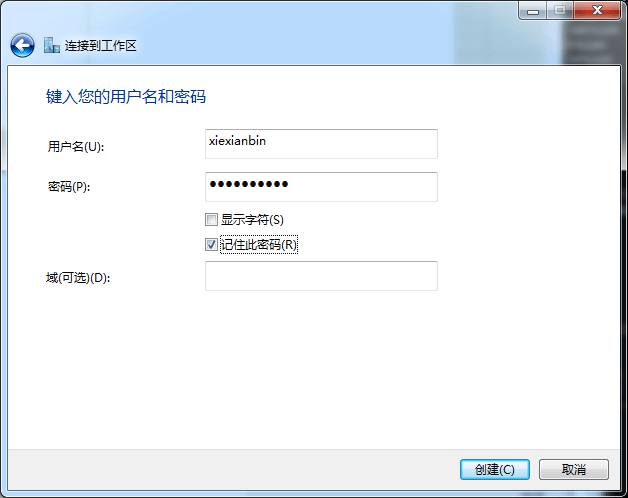
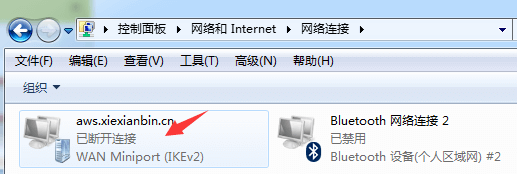
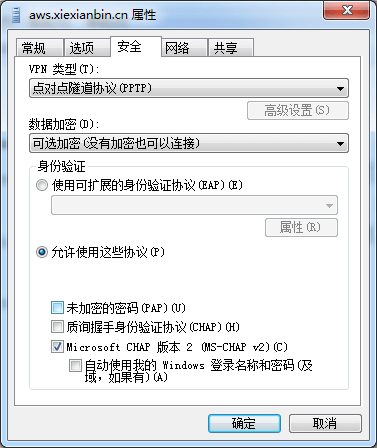
windows 链接 vpn
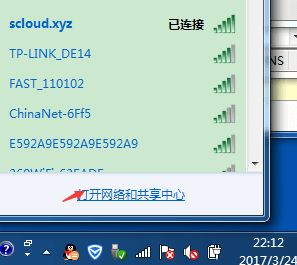

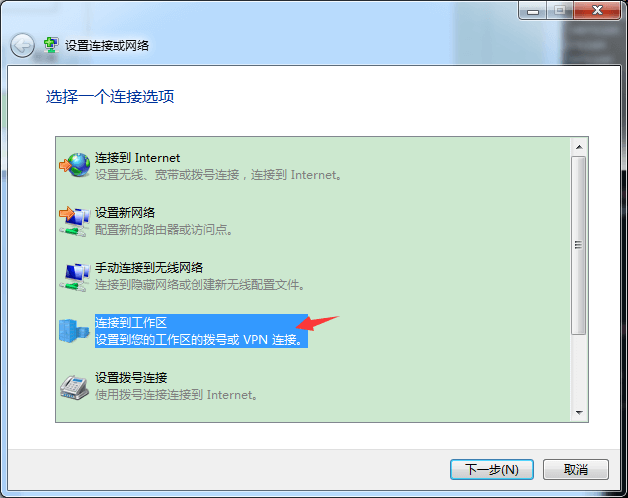
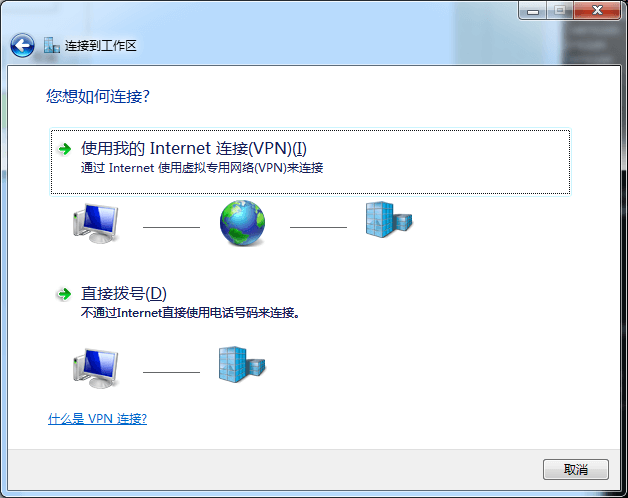
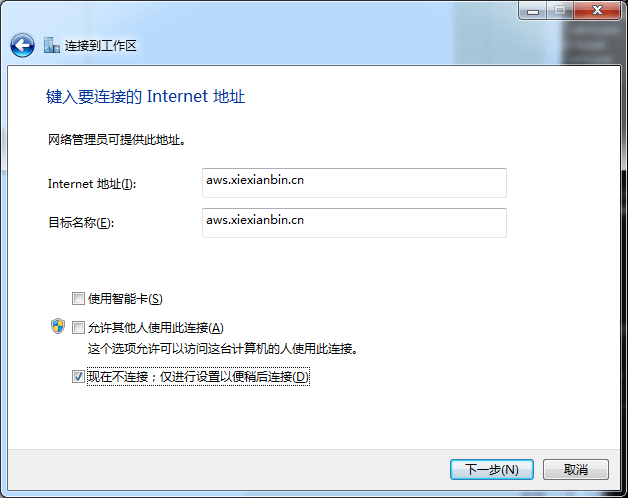
防火墙
需放行 TCP 1723 端口和 GRE 协议(IP 协议号 47):
bash
# iptables 放行示例
iptables -A INPUT -p tcp --dport 1723 -j ACCEPT
iptables -A INPUT -p gre -j ACCEPT
问题处理
- 619 问题
bash
rm -f /dev/ppp
mknod /dev/ppp c 108 0
chmod 600 /dev/ppp- 651 问题
方法一:卸载virtual box等软件。
方法二:logwtmp 不兼容问题:
bash
[root@ip-172-31-17-56 ~]# vi /etc/pptpd.conf
...
#logwtmp
...- Maximum of 100 connections reduced to 91, not enough IP addresses given
错误日志:
text
Mar 24 10:36:28 ip-172-31-17-56 systemd: Stopping PoPToP Point to Point Tunneling Server...
Mar 24 10:36:28 ip-172-31-17-56 systemd: Started PoPToP Point to Point Tunneling Server.
Mar 24 10:36:28 ip-172-31-17-56 systemd: Starting PoPToP Point to Point Tunneling Server...
Mar 24 10:36:28 ip-172-31-17-56 pptpd[5521]: MGR: Maximum of 100 connections reduced to 91, not enough IP addresses given
Mar 24 10:36:28 ip-172-31-17-56 pptpd[5521]: MGR: Manager process started
Mar 24 10:36:28 ip-172-31-17-56 pptpd[5521]: MGR: Maximum of 91 connections available将/etc/pptpd.conf中,remoteip范围配置大些。
专栏文章
- alpine 部署 v2ray 服务
- Clash 使用
- Hysteria 2 介绍
- Mitmproxy HTTPS 代理工具
- WireGuard VPN 安装和使用
- Inode VPN 使用
- V2ray 介绍
- Shadowsocks Python版一键安装脚本
- OpenVPN client 使用问题
- OpenVPN server 配置文件详细说明
- CentOS 6/7 安装配置 OpenVPN Server
- CentOS 架设PPTP VPN服务教程(当前)
最近更新
最新评论