OpenvSwitch 常用命令:ovs-ofctl
专栏文章
ovs-ofctl命令在OpenvSwitch中管理OpenFlow交换机的工具,可以对流表进行增、删、改、查等操作。本博客主要介绍如何使用OpenvSwitchovs-ofctl命令
什么是流表
流表类似于交换机的MAC地址表,路由器的路由表,是 OpenvSwitch 指挥流量转发的表。示例如下:
- 交换机 MAC 表
SW1# show mac address-table
          Mac Address Table
-------------------------------------------.
Vlan    Mac Address       Type        Ports
----    -----------       --------    -----
All    0050.5639.e982    STATIC      CPU
All 0050.5639.e983 STATIC CPU- 路由表
$ route -n
Kernel IP routing table
Destination     Gateway         Genmask         Flags Metric Ref    Use Iface
0.0.0.0         172.20.0.1      0.0.0.0         UG    0      0        0 ens33
169.254.0.0 0.0.0.0 255.255.0.0 U 1002 0 0 ens33- OpenVswitch 流表
$ ovs-ofctl dump-flows br-0
cookie=0x0, duration=2616.921s, table=0, n_packets=0, n_bytes=0, priority=0 actions=NORMAL说道了流表,就必须提及流表控制器。控制器是给交换机下发流表的设备,常见的SDN控制器有OpenDaylight(简称ODL),安装 OpenDayLight 参考本文。
结构
常用流表字段
man ovs-ofctl中有详细介绍
in_port=port传递数据包的端口的 OpenFlow 端口编号dl_vlan=vlan数据包的 VLAN Tag 值,范围是 0-4095,0xffff 代表不包含 VLAN Tag 的数据包dl_src=<MAC>匹配源MAC 地址- 01:00:00:00:00:00/01:00:00:00:00:00 代表广播地址
- 00:00:00:00:00:00/01:00:00:00:00:00 代表单播地址
dl_dst=<MAC>匹配目标MAC 地址dl_type=ethertypedl_type=0x0800代表 IPv4 协议dl_type=0x086d代表 IPv6 协议dl_type=0x0806代表 ARP 协议
nw_src=ip[/netmask]匹配源IPv4 地址nw_dst=ip[/netmask]匹配目标IPv4 地址nw_proto=proto- 当
dl_type=0x0800时,匹配 IP 协议编号 - 当
dl_type=0x086d代表 IPv6 协议编号
- 当
arp_spa=ip[/netmask]当dl_type是arp时,arp_spa代表源ip地址arp_tpa=ip[/netmask]当dl_type是arp时,arp_tpa代表目标ip地址table=number指定要使用的流表的编号,范围是 0-254。在不指定的情况下,默认值为 0。通过使用流表编号,可以创建或者修改多个 Table 中的 Flow
常用action
man ovs-ofctl中有详细介绍
output:port输出数据包到指定的端口。port 是指端口的 OpenFlow 端口编号mod_vlan_vid:vlan_vid修改数据包中的 VLAN tagstrip_vlan移除数据包中的 VLAN tagmod_dl_src:mac/mod_dl_dst:mac修改源或者目标的 MAC 地址信息mod_nw_src:ip/mod_nw_dst:ip修改源或者目标的 IPv4 地址信息resubmit([port],[table])Re-searches this OpenFlow flow table (or the table whose number is specified by table) with the in_port field replaced by port (if port is specified) and executes the actions found, if any, in addition to any other actions in this flow entry
工作原理
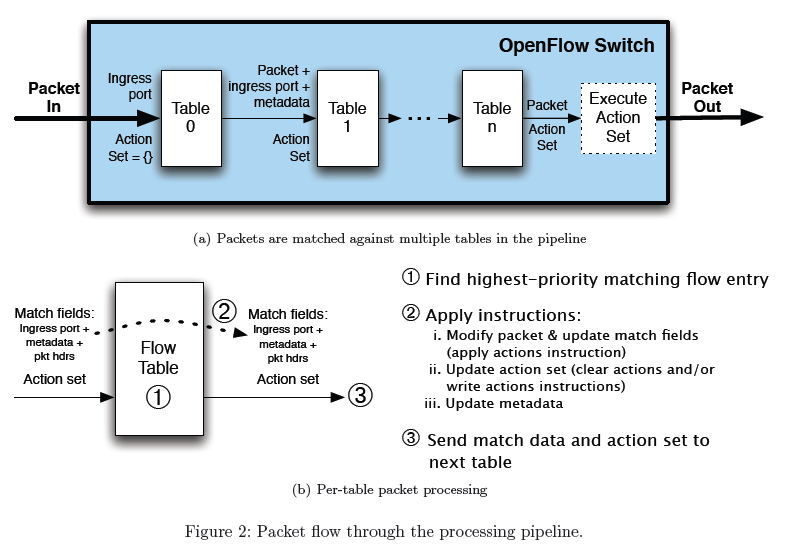
ovs的flow处理流程
ovs-ofctl 的作用
ovs-ofctl 命令是管理 OpenvSwitch 中管理 OpenFlow 协议的工具。
查看命令帮助:
$ ovs-ofctl --help查看 OVS 支持的 OpenFlow 协议的版本:
$ ovs-ofctl --version
ovs-ofctl (Open vSwitch) 2.12.3
OpenFlow versions 0x1:0x6    # 支持的 OpenFlow 版本
For OpenFlow switches
Dump flows
# Dumps OpenFlow flows 不含 hidden flows (常用)
ovs-ofctl dump-flows br-0

# Dumps OpenFlow flows 包含 hidden flows
 bridge/dump-flows br-0

# Dump 特定 bridge 的 datapath flows 不论任何 type
 dpif/dump-flows br-0

# Dump 在 Linux kernel 里的 datapath flow table (常用)
ovs-dpctl dump-flows [dp]

# Top like behavior for ovs-dpctl dump-flows
ovs-dpctl-top
Group Table
建立 Group id 及对应的 bucket
ovs-ofctl -O OpenFlow13 add-group br-0 group_id=5566,type=select,bucket=output:1,bucket=output:2,bucket=output:3使用 Group Table
ovs-ofctl -O OpenFlow13 add-flow br-0 in_port=4,actions=group:5566OpenFlow Trace
Generate pakcet trace
ofproto/trace br-0 in_port=1,dl_src=00:00:00:00:00:01,dl_dst=00:00:00:00:00:02 -generate其它
查询 OpenvSwitch 版本
ovs-ofctl -V查询指令历史记录
ovsdb-tool show-log [-mmm]ethtool -i p0查看if情况ovs-ofctl add-flow br-0 "table=0, dl_src=01:00:00:00:00:00/01:00:00:00:00:00, actions=drop"屏蔽所有进入 OVS 的以太网广播数据包ovs-ofctl add-flow br-0 "priority=1 idle_timeout=0,in_port=100,actions=mod_nw_src:9.181.137.1,normal"修改从端口 p0 收到的数据包的源地址为 9.181.137.1ovs-ofctl add-flow br-0 idle_timeout=0,dl_type=0x0800,nw_proto=1,actions=output:102重定向所有的 ICMP 数据包到端口 p2ovs-ofctl add-flow br-0 "priority=3,in_port=100,dl_vlan=0xffff,actions=mod_vlan_vid:101,normal"对于从端口 100 进入交换机的数据包,如果它不包含任何 VLAN tag,则自动为它添加 VLAN tag 101ovs-ofctl dump-tables br-0查看交换机中的所有 Tableovs−ofctl dump−flows br-0查看交换机中的所有流表项ovs-ofctl del-flows br-0 "in_port=100"删除编号为 100 的端口上的所有流表项ovs-ofctl show br-0查看交换机上的端口对应的openflow编号
- 上一页: 日志文件系统 -- Journaling file system
- 下一页: TCP/IP 协议族
专栏文章
- 在 OpenvSwitch 中验证 OpenFlow 流表
- OpenvSwitch 常用命令:ovs-tcpdump
- OpenvSwitch 常用命令:ovs-appctl
- OpenvSwitch 常用命令:ovs-dpctl
- OpenvSwitch 常用命令:ovs-ofctl(当前)
- OpenvSwitch 常用命令:ovs-vsctl
- 编译 OpenvSwitch RPM 包
最近更新
最新评论